
Catherine L.
Jul 31, 2026
•9 minutes
Gaming Desk Mat Buyer's Guide: Surface, Base, Size
A hands-on gaming desk mat buyer's guide: how surface, rubber base, size, and print quality decide which mat actually lasts under your setup.

Blue Horizons Desk Mat with Keyboard on Desk
I've bought and broken in more desk mats than I care to admit, and a gaming desk mat has to do two jobs a mouse pad never had to think about: track your sensor cleanly and sit under your keyboard without shifting when you slam a bottom-out.
That dual role is the whole reason picking one is more than scrolling a grid of pretty prints. I still remember the first full-desk mat I ran, and the moment my wrist stopped catching a seam every time I reached for the mouse was the moment I stopped using two separate pads for good. Get the surface, base, and size right and the gaming desk mat disappears under your hands the way a good peripheral should.
If you want the deep background on how mats interact with switch acoustics and build sound, our desk mat guide for mechanical keyboards is the hub for that. This piece is my buyer's-side companion: how I match surface, thickness, and size to how the thing actually gets used.
What Makes a Gaming Desk Mat Different From a Regular Mouse Pad
A mouse pad exists to give your sensor a consistent surface. A gaming desk mat is a unified work surface, so it also has to keep a keyboard planted, absorb some desk resonance, and not curl or fray under a rig you touch every day. Most enthusiast-grade mats, including the full Kinetic Labs lineup, share a 900 x 400 x 4mm spec, and those numbers are chosen, not arbitrary.
Surface area: why 900 x 400mm is the sweet spot
At 900mm wide you get a full keyboard plus a mouse zone deep enough for low-sensitivity sweeps, with no seam or edge under either hand. Split that across two smaller pads and your wrist crosses a break every time you reach from board to mouse, which I feel more than I ever expected to. One continuous surface is the point.

Alberta Ice Desk Mat
Thickness matters: 4mm rubber-backed versus thin hard pads
A 4mm rubber-backed mat gives your wrists a slightly compliant landing instead of the dead stop of a hard pad on a wood desk. It also does something for sound: a rubber-backed cloth mat under a stiff board absorbs some of the desk-transmitted resonance, so a hollow case reads a touch deeper and the ping quiets down. A gasket-mounted or polycarbonate board is already damped, so the mat changes its sound less, but the ergonomic benefit stays either way.
Material composition and durability
The construction is simpler than the marketing makes it sound: a woven cloth top bonded to a rubber base, with the whole edge stitched. What separates a mat that lasts from one that doesn't is how that cloth is woven and how the print is laid into it. a dye-sublimation print bonds color into the cloth fibers rather than sitting on top, so the design doesn't wear off under mouse friction the way a surface coating can. I've had a stitched cloth mat ride under the same mouse corner for years without the weave opening up, and that longevity is the whole reason I stopped buying cheap heat-sealed pads.
Stitched edges versus raw-cut edges
Stitched, printed edges are the clearest build-quality tell on a mat. Heat-sealed or raw-cut perimeters start to fray within months once daily mouse friction works at them, while a stitched edge holds up for years of the mouse riding over the same corner. Every Kinetic Labs mat uses stitched edges with the print wrapping to the perimeter, which is why the design doesn't stop short of the border.
Surface Material Breakdown: Cloth Surfaces Across the Range
The surface is the part that actually changes how your mouse behaves, and it's the part I check first. There are a few cloth surfaces across the Kinetic Labs range, and each one shifts glide force in a direction you can feel within a minute of moving your mouse.
Standard cloth: balanced glide and control
Standard cloth is the middle ground, and it's what most mats here use, including Lost City, Bloom, Octopus, and Pixel Comet V2. It reads cleanly on both optical and laser sensors, and the weave gives you enough friction to stop a flick without the mouse skating past the target. If I'm not chasing an extreme, this is the surface I default to.
Textured cloth: micro-friction for precision
Some mats add a finer surface grain that increases stopping precision. PTFE mouse feet still glide, but the micro-friction gives you more tactile feedback at the end of a movement, which heavier-handed players and high-sensitivity MOBA users tend to prefer for pulling a cursor onto a small target. Low-sensitivity FPS players who want long, effortless swipes usually favor a smoother standard cloth instead.
Waterproof cloth: liquid resistance for a daily driver
A waterproof cloth top, which you'll find on mats like the Chained Together mat, the Apex mat, and the Mardeluna Picnic mat, isn't really about spill drama. It's about desk life. A mat that lives under a coffee mug or a water glass all day survives the condensation ring and the occasional knock that would soak into a standard cloth top and stain the print. If your keyboard lives on the same mat you eat and drink beside, this is the surface that lasts. I keep one of these on the desk where I actually drink coffee, and it's outlived every standard-top mat I've put in that spot.
All these surfaces read every mouse fine. The difference PTFE feet notice is speed: smoother cloth lets them coast, textured cloth reins them in. Rubber-footed mice grip harder on any of them, so the surface choice matters slightly less if you haven't swapped in PTFE skates yet.

Alpaca Desk Mat
Compatibility with Gaming Equipment
I've never met a mouse a cloth mat couldn't handle. Optical and laser sensors both track the woven surface without hiccups, and the low 4mm profile means a wired keyboard's cable and a mouse bungee both sit at a natural height. If you run a wireless setup, a cloth mat won't interfere with the receiver the way some hard surfaces can. The one compatibility note I'd flag: rubber-footed mice grab a cloth surface harder than PTFE-skated ones, so if you're used to gliding on a fast pad, swap in PTFE feet before you judge a mat's speed.
RGB Lighting and Design Options
If you came looking for an RGB-edge, USB-powered mat, these aren't that. The Kinetic Labs range is printed cloth, so the "lighting" is whatever your keyboard and setup throw onto it, and honestly that's how I prefer it: no cable running out of the mat, no controller to fuss with, nothing to fail. What you get instead is print variety. For anyone building a themed setup, the print is a functional part of the decision, not just decoration. The range covers a wide spread: Marble Liquid V2 for light and white builds, Chained Together as a bold graphic, Lost City for detailed illustrative art, Bloom's florals for pastel keycaps, the retro pixel art of Pixel Comet V2, the playful Octopus, atmospheric Moonlit Oasis, and the clean botanical Cactus.
Print quality and edge wrap
A dye-sublimation print bonds color into the cloth fibers rather than sitting on top, so the design doesn't wear off under mouse friction the way a surface coating can. Combined with stitched edges that wrap the art to the perimeter, that's the difference between a mat that stays vibrant for years and a budget print that fades at the mouse zone.
Matching the mat to your keycap colorway
Enthusiasts pick mats to echo a keycap set the same way they pick a case color. A pastel PBT set sits naturally on Bloom; a dark, minimal build reads well on Chained Together or a marble surface. If you're planning a build around a palette, our PBT keycaps buyer's guide and the dark mode keyboard guide pair well with choosing a mat to match.

Burger Desk Mat with Octopus PBT Keycaps
Rubber Base, Stability, and Cable Management
Buyers stare at the top print and ignore the base, which is the part doing the work of keeping the mat still. The rubber bottom is what stops the whole mat from creeping during an aggressive flick or a hard typing session, and denser rubber both grips better and resists curling at the corners over time.
Non-slip backing and stability across desk surfaces
A textured rubber base grabs a bare wood or laminate desk well. Glass is the hard case, since a smooth base on smooth glass can slide, and a slightly tacky, higher-density rubber is what keeps a mat planted there. If your desk is glass or a very slick laminate, I'd prioritize base quality over everything except size. The stability test I use is simple: plant a palm, drag hard toward the mouse, and see if the mat travels with your hand. A good base doesn't.
Cable management
There isn't a routing channel built into a flat mat, and I don't miss one. What the 4mm height does give you is a clean line to tuck a keyboard cable or a mouse bungee base under, and the 400mm depth leaves a strip of bare desk behind the mat for a cable pass-through or a monitor stand. I run my keyboard cable up the back edge and out behind the mat, so nothing crosses the working surface.
Latex allergy considerations
Every Kinetic Labs mat carries a note not to use it if you have a latex allergy, because the rubber base can trigger a reaction. Most listings skip this entirely, and it's a real spec worth checking before you put your hands and wrists on a surface for hours a day. If latex is a concern for you, factor that in before ordering any rubber-backed mat, ours included.
Installation, Setup, and Break-In
There's no installation to speak of: unroll the mat, set your keyboard and mouse on it, done. The one setup step people skip is the break-in. Mats ship rolled, so expect the corners to lift for the first few days. I lay the mat flat under a stack of books overnight, or just leave it unrolled for a week, and it settles. Denser rubber flattens faster and stays flat longer, which is another reason base quality earns its keep. Do this once and you never think about it again.
Size Guide: Matching Your Desk Mat to Your Keyboard Form Factor
Several mats here come in three sizes, and each tier maps to a real keyboard form factor. Match the mat to your board and your sensitivity, not to whatever looks biggest in the photo.
- Small (32 x 27cm): compact setups, 60% boards, and portable rigs you pack in a bag. Enough for the board plus a modest mouse zone.
- Medium (45 x 40cm): fits 65% and TKL boards with moderate mouse room. A good all-rounder for a desk that isn't huge.
- Large (90 x 40cm): full-size and 1800-layout boards with a real mouse-travel area. This is the XL gaming mouse pad territory where an extended mouse pad and a keyboard live side by side.
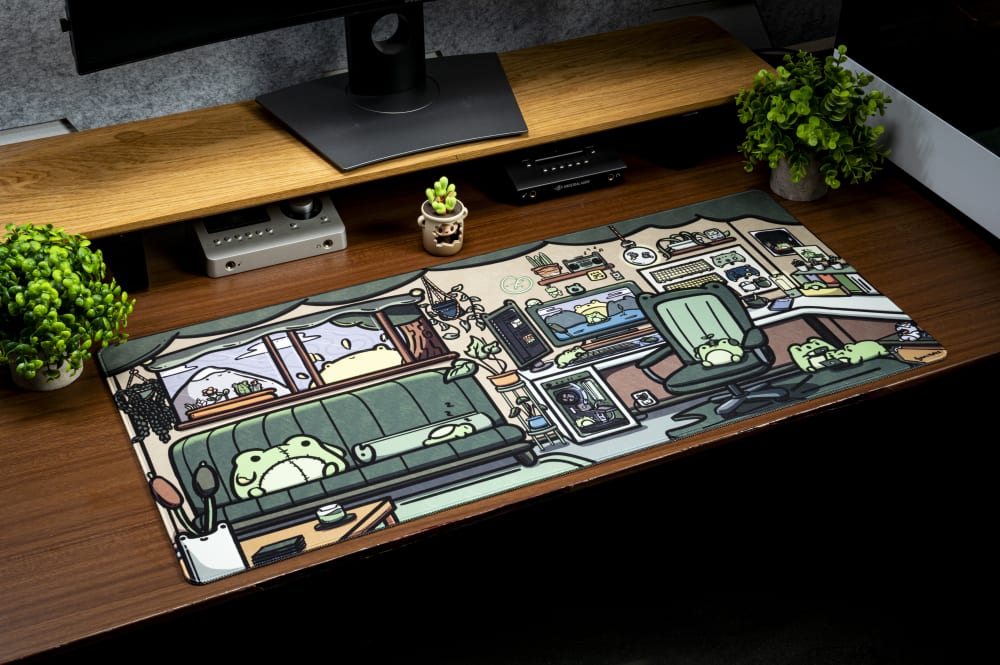
Froggy Desk Mat
Desk depth matters
The 400mm depth is deliberate. Most gaming desks run 600 to 800mm deep, so a 400mm mat occupies the front third where your hands actually work and leaves a strip behind it for a monitor stand or cable runs. A 65% user on a normal desk doesn't need the 90cm large unless they low-sensitivity game and want the horizontal room for big swipes. I tell people to buy the width their mouse travel demands, not more.
Performance Impact on Gaming
The mat won't add aim you don't have, but it changes how consistent your aim is, which matters more than it sounds. On a stable, uniform cloth surface, every flick starts and stops the same way because the friction is even edge to edge and the mat never shifts under the mouse. The wrist support from a 4mm cushion also means fewer micro-adjustments over a long session, and the difference I notice most is late in a night of play: my hand fatigues slower on a compliant mat than on a bare desk or a thin hard pad. Smoother cloth suits low-sensitivity swipers; a grippier weave suits players who want a firmer stop. Neither is faster in a vacuum, they just reward different hands.
Gaming Desk Mat Cleaning and Maintenance
Cloth mats clean up easily if you treat the rubber right. For daily marks, I wipe with a damp microfiber cloth and let it air dry. For a full clean, hand wash in cold water, or machine wash cold with no spin cycle, then air dry flat.
Never machine-dry a rubber-backed mat. heat degrades and cracks the rubber base of a mat, which is what ruins the grip and starts the corners curling. Air drying flat also protects the stitched edges and keeps the print vibrant. If a mat curls after washing, flatten it under books rather than reaching for a hairdryer or an iron, since heat does the same damage a dryer would.
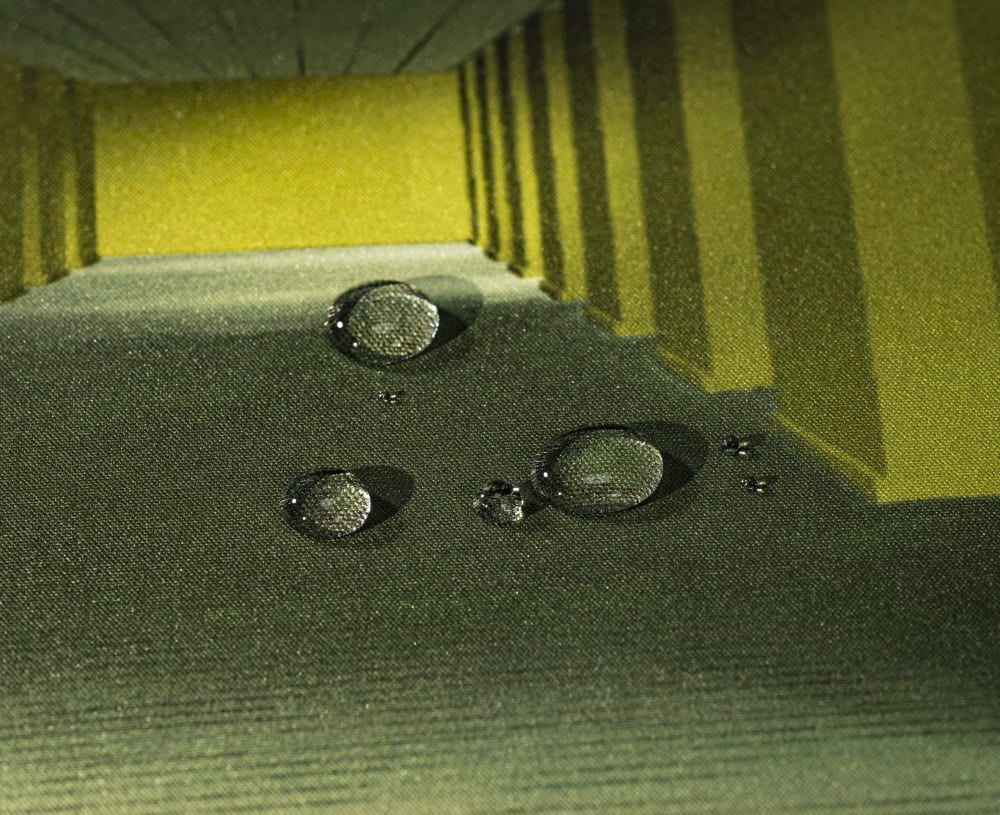
Backrooms Desk Mat Waterproof Surface
Price, Value, and Warranty
A cloth gaming desk mat this size sits in the affordable end of a keyboard build, which is part of why I think it's the highest-value upgrade most people ignore. Compared to a new keyboard or a set of PBT keycaps, a mat costs a fraction and touches your hands just as much. When you weigh value, look past the sticker at the build: stitched edges, dense rubber, and a bonded print are what decide whether a mat lasts a few months or a few years, and a slightly higher price for those three things pays for itself in longevity.
On warranty and returns, policies vary by retailer, so check the specific return window and any manufacturing-defect coverage at checkout before you buy. Because a mat ships rolled and breaks in over a few days, I'd give any new mat that settling period before deciding whether it's a keeper, rather than judging it fresh out of the tube.
Which Kinetic Labs Gaming Desk Mat Is Right for You?
I pick by how the surface gets used, not by the picture alone, and that's the advice I'd give anyone. If you're a mouse-heavy or high-sensitivity player, a textured-cloth mat like the Marble Liquid V2 gives you the micro-friction that helps you stop precisely. If your desk sees daily coffee and the occasional knock, a waterproof top like the Chained Together mat keeps the ring and the spill out of the print. On a budget, the Pixel Comet V2 and Octopus mats come in small, medium, and large, so you can size to a 60%, TKL, or full-size board without overpaying. And if you're matching a colorway, the Bloom mat suits pastel keycap sets, while Lost City, Moonlit Oasis, and the Cactus mat cover themed, colorway-matched builds. You can compare the whole spread across our desk mat selection.

Chained Together Desk Mat
Customer Reviews and Ratings
I'd never buy a mat on marketing copy alone, and neither should you. When I read reviews, I skip the star average and look for the same three things I test myself: does the base hold on the reviewer's desk type, do the edges stay put after a few months, and does the print survive the mouse zone. A photo of a mat that's a year old tells you more than a hundred five-star lines posted the week it arrived. Weight the reviews that mention long-term use, and be honest about your own desk surface when you read the glass-desk complaints, because a slide on glass is usually a base-density problem, not a defect.
Frequently asked questions
I get the same handful of questions every time I recommend a mat, so here they are.
The size question comes up most. Match the mat to your keyboard and sensitivity: a 32 x 27cm small suits 60% boards and portable rigs, 45 x 40cm medium fits 65% and TKL boards, and 90 x 40cm large fits full-size and 1800 layouts with full mouse travel. I'd only go large on a smaller board if you low-sensitivity game and want the horizontal swipe room.
On what actually separates a mat from a mouse pad: a mouse pad only supports your mouse, while a gaming desk mat is a single continuous surface sized to hold both your keyboard and mouse. That lets your wrist move between board and mouse without crossing a seam, and the larger footprint also damps some desk resonance under a mechanical keyboard.
Cloth versus hard is the other recurring one. Cloth is my all-around pick because it gives controllable glide, a slightly compliant surface for your wrists, and works under a keyboard. Hard pads offer faster raw speed but they're dead-stiff under your hands and do nothing for a board, so most enthusiast setups run a 4mm rubber-backed cloth mat. That 4mm is the standard height: a soft landing over a hard desk without lifting your hands into an awkward angle.
And waterproof mats are worth it if your keyboard shares a desk with drinks or food. A waterproof cloth top resists condensation rings, spills, and knocks that would soak into and stain a standard cloth mat, so it holds up far better as a daily driver. The tracking surface for your mouse is effectively the same either way.