
Catherine L.
Jun 10, 2026
•9 minutes
Mechanical Keyboard Keycaps: The Complete Buyer's Guide
A practical guide to keycap materials, profiles, compatibility, and care, so you pick caps that feel, sound, and look right on your mechanical keyboard.

Kinetic Labs Whale PBT Keycaps on Wooden Desk
Keycaps are the part of your keyboard you actually touch. They shape how your board feels, sounds (to some extent), and how it looks sitting on your desk. You can swap switches and stabilizers all you want, but nobody sees those. The mechanical keyboard keycaps are the face of the build.
That is why this guide treats keycaps as a real decision, not just a grid of pretty pictures. Material, profile, and the way the legends are printed each change the typing experience in ways you can measure and hear. Get those three right, and a budget board can outclass something twice its price.
What Exactly Are Keycaps? (And Why They Matter More Than You Think)
A keycap does three jobs at once. It gives you the surface you press (feel), it shapes the acoustics of every bottom-out (sound), and it carries the look of the build (aesthetics). Most people shop for the third one and get surprised by the first two.
Here is the thing that hooks most beginners: take the exact same board, pull the stock caps, and drop on a thick PBT set. The sound deepens. The clack turns into something rounder and lower, the thock people keep chasing. Your fingers notice the texture change before your ears catch up. None of the switches moved. You just changed the plastic on top.
So when you browse our keycaps collection, think past the colorway for a second. The grams and millimeters underneath the paint are doing most of the work.
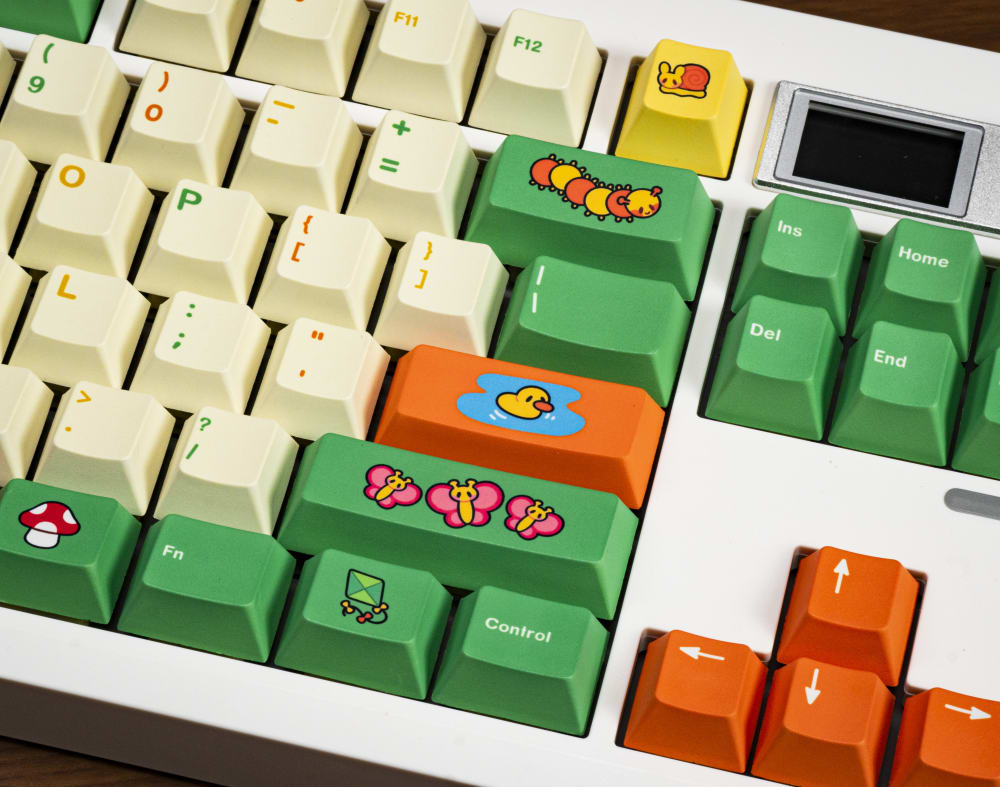
Picnic PBT Keycaps
Keycap Materials: PBT vs ABS (And When Each Wins)
Keycap material is the single most searched keycap question, and it usually gets answered with one sentence: PBT good, ABS shiny. That is half the story and the wrong half.
ABS: shine, shine, shine
ABS (acrylonitrile butadiene styrene) is the older, cheaper, more moldable plastic. It takes color and double-shot legends beautifully, which is why a lot of bright, saturated sets and high-end brands like GMK use it. The catch is shine. Over months of use, the oils from your skin and the friction of your fingertips slowly polish the surface. That gloss is not dirt, it is plasticization, the top layer of the plastic getting smoothed and partially broken down where you touch it most. WASD and the spacebar go glassy first. Some people hate it. Some people read it as patina and leave it.
PBT: thicker walls, deeper sound, shine resistance
PBT (polybutylene terephthalate) is denser and more heat-resistant, and it resists that shine for far longer. It also tends to come in thicker walls. PBT keycaps stocked at Kinetic Labs run 1.50mm thick, which is genuinely chunky for a retail set and a big part of why they sound the way they do. The Hippo PBT caps are both good examples of what that material does in the hand: a slightly dry, matte texture that does not get slick.
The tradeoff is shrinkage. PBT shrinks more and less predictably as it cools in the mold, which makes tight, consistent double-shot legends hard to pull off at scale without warping. That is why most PBT sets use dye-sublimation instead.

Hippo PBT Keycaps
What "double-shot" and "dye-sub" mean for legend durability
Double-shot means the legend is a second piece of plastic molded right into the cap, so the character goes all the way through. It can never wear off because it is not printed on; it is part of the cap.
Dye-sublimation heats the dye to the surface of the plastic, where it bonds below the top layer. It will not rub off either, but it only goes dark-on-light easily, which is why so many dye-sub sets are light caps with darker legends. Most of the Kinetic Labs lineup, Matcha PBT and Coffee Shop V2 PBT included, is dye-sub PBT for exactly this reason.
| Spec | ABS | PBT |
|---|---|---|
| Typical wall thickness | thinner | thicker (1.50mm on Kinetic Labs) |
| Texture | smoother, glossier | drier, matte |
| Shine timeline | months | far slower, often years |
| Legend method | double-shot friendly | dye-sub friendly, double-shot harder |
There is a longer write-up on this if you want the full breakdown in what to look for in mechanical keyboard keycaps.
Keycap Profiles Explained: Height, Curvature, and Row Sculpting
Profile is the shape and height of the caps, and it is the part that confuses new builders the most. It is both a feel choice and a look choice, because taller profiles have more air inside them and amplify the sound.
Sculpted profiles: OEM, Cherry, SA, KAT
Sculpted means each row is a different height and angle, contoured so your fingers land naturally. OEM is the tall, common profile most pre-built boards ship with (R3, the home row, sits around 11.2mm). Cherry is shorter and the enthusiast default, with R3 closer to 9.4mm, which is why people describe Cherry as feeling lower and more "settled." Every Kinetic Labs set listed here is standard Cherry profile. SA is tall, round, and sculpted, almost spherical on top, and it sings. KAT sits between SA and Cherry.

Arctic PBT Keycaps
Uniform profiles: DSA, XDA, MT3
Uniform means every row is the same height. DSA keycaps are low and spherical, XDA are taller and flatter on top, MT3 is deep and scooped. People either love uniform profiles for the clean, symmetrical look or find them slightly awkward to touch-type on because there is no row sculpting guiding the fingers. There is no right answer, only your hands.
Low-profile keycaps
Low-profile caps pair with low-profile switches for slim, portable builds. You trade some sound depth and some of that satisfying travel for a board that fits in a bag. Worth it for a travel deck, usually not what you want on a desk centerpiece.
How to tell which profile is already on your board
Look at it from the side. If the rows step up toward the top edge in clear tiers, it is sculpted, most likely OEM or Cherry. If it is flat across, it is uniform. When in doubt, OEM is the safe bet on anything that came pre-assembled.
Keycap Compatibility: Will They Actually Fit Your Board?
Short answer: keycaps are not universal, but most of them share one standard.
Cherry MX cross-stem: the de-facto standard
Almost every aftermarket set, including the Brass Metal Artisan, uses a Cherry MX style cross stem, the little plus-shaped hole on the underside. If your switches are Cherry MX or any of the dozens of MX clones (Gateron, Kailh, JWK, and so on), cross-stem caps will press right on. That covers the overwhelming majority of hot-swap and custom boards.
Layout coverage: TKL, 65%, 75%, and the modifiers problem
Stem fit is only half of compatibility. The other half is whether the set includes the right sizes for your layout. A standard TKL is easy. The trouble starts on compact boards where the modifier keys (Ctrl, the right side cluster, the bottom row) get shrunk to non-standard widths. A 65% or 75% board might want a 1.75U right Shift or extra 1U keys that a tenkeyless-focused kit just does not include.
Novelty, ISO, and non-standard bottom-row gotchas
The two that bite people most: spacebar width (6.25U is standard, but some boards use 7U) and the bottom-row mods (1U versus 1.25U versus 1.5U). Buying a beautiful set and finding your spacebar will not fit is the single most common keycap purchase regret. Pull up your board's layout, count the odd keys, and check them against the kit listing before you check out. Two minutes there saves a return.

Max102 100% Layout Keyboard
Types of Keycap Sets: What to Shop For
Full base kits vs. budget tenkeyless sets
A full base kit, the 160 to 175 key range you see across the Kinetic Labs line, covers a full-size board plus the extra modifier sizes most compact layouts need. Smaller, cheaper sets cover a TKL and not much else. If you own anything other than a 60% or TKL, count your keys before assuming a smaller kit fits.
Sound and Feel: How Keycap Choices Shape Your Typing Experience
Enthusiasts argue about this endlessly, and most of the argument comes down to physics you can actually feel.
Thickness and density drive pitch. A thick PBT cap, those 1.50mm walls again, has more mass and less hollow ring, so it bottoms out lower and rounder. That is the thock. Thin ABS caps ring higher and clackier. Neither is wrong, but if you are chasing a deep sound signature, wall thickness matters as much as your switch choice.
Profile height plays into how the press feels before you even bottom out. Taller caps put your finger higher off the plate, which changes how you perceive pre-travel and gives sound more room to resonate. Lower Cherry caps feel quicker and quieter.
Texture is the part you only notice with your fingertips. Smooth, matte, and lightly sandblasted surfaces all read differently mid-type. The slightly textured PBT across the Kinetic Labs line has a dry grip that a lot of people prefer over slick ABS. And mixed-material artisans change feel on one key entirely: that silicone paw on the Kitty Paw gives the Escape key a soft, squishy press that stands out from the firm plastic everywhere else, which is half the fun of it.
How to Choose the Right Keycaps for Your Build
Skip the feature checklist and shop by what the board is for.
Daily driver. You want durability and shine resistance, full stop. Lean PBT, lean dye-sub or double-shot legends so they never wear. A full Kinetic Labs set in the $59.99 to $64.99 range, like Matcha PBT or Galaxy PBT, gives you a set that still looks new after a year of heavy use.
Endgame or show board. Now profile aesthetics and colorway cohesion lead. Pick the profile that matches the look you want (taller for drama, Cherry for clean), confirm the kit covers your exact layout, and budget for a focal artisan. The Brass Metal Artisan at $44.99 is the kind of permanent centerpiece a show board earns. If you're feeling spendy, try the full-metal keycap set by Gateron.

Gateron Metal Keycap Set
Caring for Your Keycaps: Cleaning, Maintenance, and Storage
Good keycaps are a real investment, so a little care keeps them looking right.
For routine cleaning, pull the caps and let them soak in warm water with a drop of dish soap. An ultrasonic cleaner does the deep work on a big set if you have one. Rinse, then let them dry completely before they go back on, ideally overnight, because trapped water under a cap is a nuisance.
What to avoid matters more than what to do. Keep isopropyl alcohol off printed and ABS legends, it can lift and smear them. No dishwashers, the heat warps caps and blasts legends off. And do not leave caps baking in direct sunlight, UV exposure fades colorways over time. On the Kitty Paw artisan specifically, that UV coating is there to protect the finish, so keeping it out of harsh sun preserves exactly what you paid for.
For extras, anti-static bags keep loose caps from collecting dust and scuffing each other, and the original trays a set shipped in are the best storage it will ever have. Hang onto them.
Get the material and the layout right up front and the rest is easy. The caps are the part of the board you live with every day, so it is the one place where spending a little attention pays off on every single keystroke. If you want the deeper material science, the Kinetic Labs PBT breakdown gives a great overview of keycaps made by Kinetic Labs.