
Catherine L.
Jun 29, 2026
•12 minutes
Corsair Keyboards Reviewed: What Enthusiasts Should Know
A Corsair mechanical keyboard review through an enthusiast lens: switch gram forces, plate material, hot-swap, LED orientation, and where to look next.
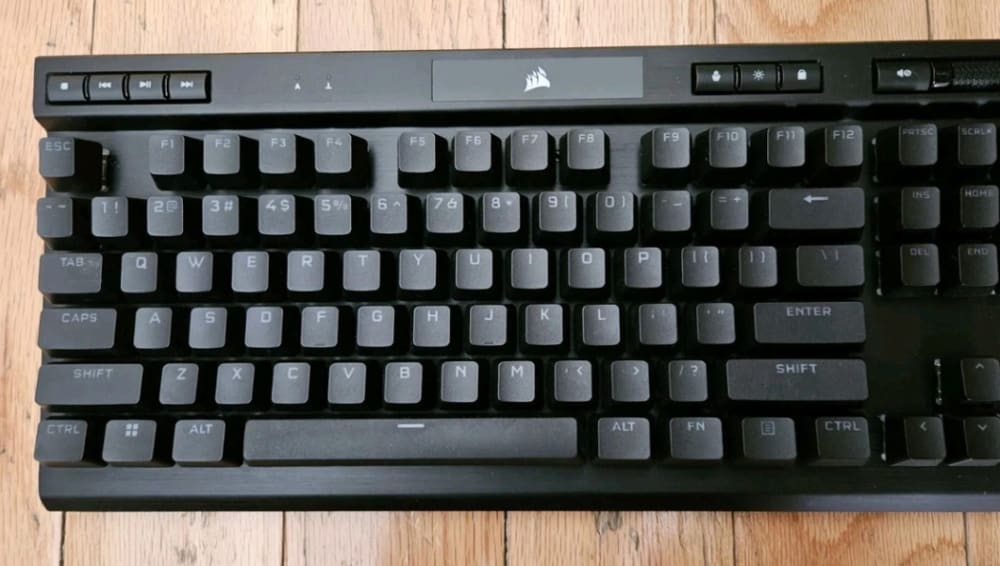
Corsair Mechanical Keyboard
Most reviews of Corsair keyboards stop at RGB lighting, brand tiers, and a few words about iCUE. That's a fine way to shop for a gaming peripheral, but it tells an enthusiast almost nothing about how these boards actually type, sound, and mod. This Corsair keyboard review measures the lineup the way the hobby measures everything else: gram forces, plate material, LED orientation, hot-swap support, and acoustics.
I want to be clear up front. This isn't a hit piece. Corsair builds some genuinely good gaming hardware, and the newer Hall-effect boards are legitimately impressive. But "good gaming peripheral" and "good enthusiast platform" are two different scorecards, and Corsair lands very differently depending on which one you use.

Corsair Keyboard Sample
What Makes a Keyboard Worth Buying for a Mechanical Enthusiast?
Before we judge any Corsair mechanical keyboard, it helps to agree on what we're even measuring. Gaming reviewers grade on lighting and software. Enthusiasts grade on a handful of physical specs that decide how a board feels in your fingers and what you can do to it later.
The specs that actually matter
A switch has more numbers than most people realize. Actuation force is how hard you press before the keypress registers, usually given in grams-force (gf). Bottom-out force is how hard you push to mash it all the way down. A Cherry MX Red actuates around 45 gf and bottoms out near 60 gf, so it feels light on the way down with a soft increase in resistance.
Then there's travel. Pre-travel is the distance before actuation (2mm on a standard Cherry MX), total travel is the full stroke (4mm), and the reset point is where the switch re-arms on the upstroke. None of this shows up in marketing copy, but it's the difference between a switch that feels mushy and one that feels crisp.
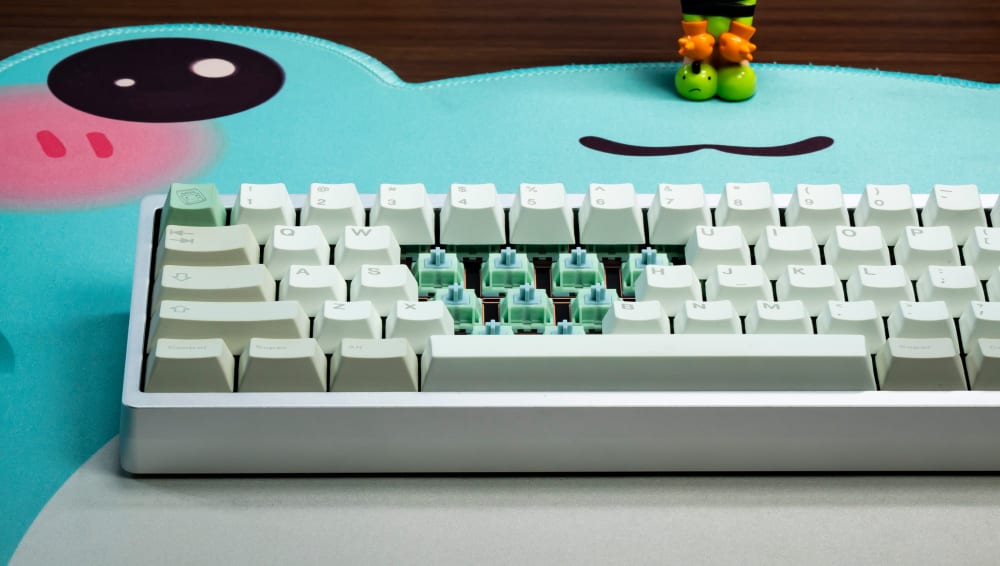
HMX Frog Switches on Enthusiast Keyboard
Plate material and its effect on flex, sound, and feel
The plate is the layer that holds your switches. Material changes everything about flex and acoustics.
- Aluminum is stiff and bright, with a high-pitched clack and almost no give.
- Brass is even stiffer and pingier.
- Polycarbonate (PC) is softer, deeper, and slightly cushioned underfoot.
- FR4 (the same material PCBs are made from) lands in the middle, with a warmer note than metal.
A board's plate material tells you most of what you need to know about its sound signature before you ever press a key.
PCB features: hot-swap, south-facing LEDs, and per-key RGB
The PCB is where the enthusiast story usually lives or dies. Hot-swap sockets let you pull and replace switches with your fingers, no soldering iron required. LED orientation matters more than it sounds: a south-facing LED sits below the switch (toward you), which clears the way for the most common aftermarket keycaps.
Why keycap compatibility depends on LED orientation
Here's the detail almost no gaming review mentions. Cherry-profile keycaps, the most widely available aftermarket profile, have their north wall built up in a way that collides with a north-facing LED. On north-facing boards you get blocked or uneven shine-through, and sometimes the cap won't seat cleanly at all. South-facing LEDs avoid the problem entirely. Cherry-profile keycaps interfere with north-facing LEDs because of the thicker north wall If you ever plan to swap keycaps, this single spec quietly decides which sets you can use.
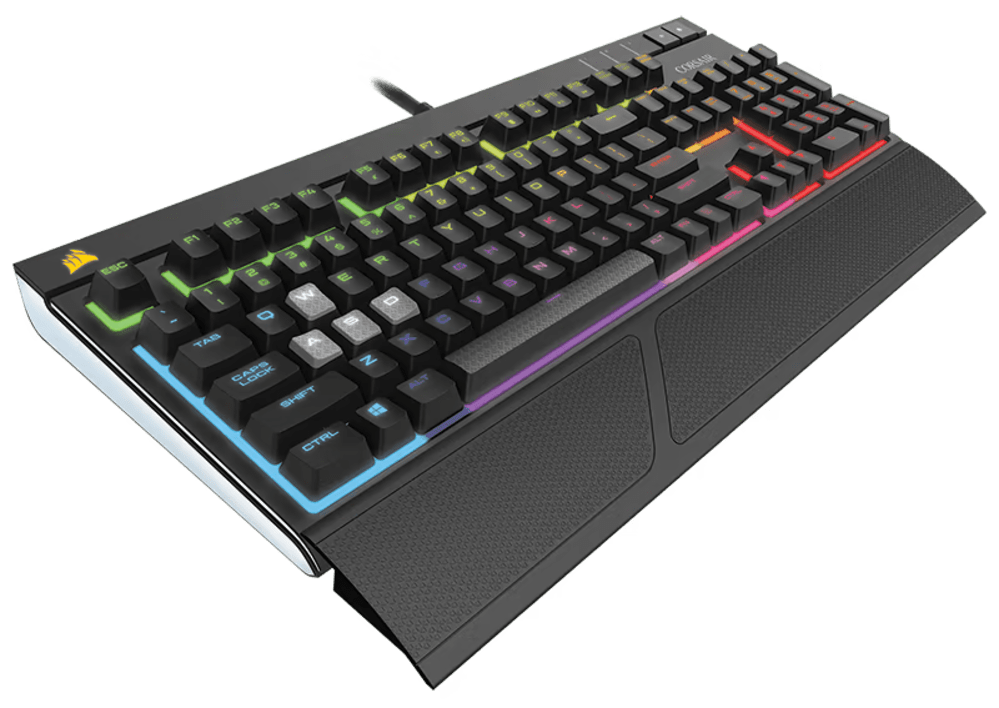
Corsair Keyboard with RGB
Corsair's Current Keyboard Lineup: Form Factors and Series Breakdown
Corsair's catalog is broad, and it's been moving toward Hall-effect (magnetic) switches on its newer flagships. A Hall-effect switch has no physical metal contact to actuate; it reads the position of a magnet in the stem. That means no contact wear over time, an analog actuation point you can set in software, and rapid trigger, where the key resets the instant you lift, not at a fixed point.
Here's how the lineup maps to layouts an enthusiast cares about.
- Full-size and TKL: The K70 family is the backbone here, a wired tenkeyless and full-size line that has carried Corsair's flagship reputation for years.
- 96% / 75%: Corsair's coverage here is thin compared to the custom world. There's no deep 75% bench, and a true 65% is essentially absent, which matters if you like that layout.
- 60% and compact: The K65 line and the Clipper Pro Mini 60 cover the small end.
- Hall-effect models: The Galleon 100 SD and Clipper Pro Mini 60 are where Corsair's magnetic-switch, rapid-trigger story shows up.
- Wireless: Corsair's SLIPSTREAM wireless targets roughly 1ms latency, well ahead of standard Bluetooth, which trades latency for convenience and battery life.
If you want a 65% with a numpad-free arrow cluster, you'll notice the gap fast. We've written before about whether your keyboard even needs arrow keys, and layout availability is exactly where Corsair's gaming-first focus shows.
K70 series: the flagship wired TKL lineup
The K70 is the model most people picture when they hear "Corsair keyboard." It's a solid, heavy, wired board with an aluminum top, per-key RGB, and a typing feel built around stiffness. It's the natural anchor for a Corsair K70 review and the board we'll compare hardest against custom options.
K65 and Clipper Pro Mini 60
The K65 and Clipper Pro Mini 60 are the compact picks. The Clipper Pro Mini 60 leans into the Hall-effect, low-latency story for competitive play.

Corsair K65 Keyboard
Galleon 100 SD and newer Hall-effect models
The Galleon 100 SD is the clearest signal of where Corsair is heading: analog magnetic switches, adjustable actuation, and rapid trigger aimed squarely at FPS players.
Corsair Switch Deep-Dive: OEM Cherry MX, Speed Variants, and Hall-Effect
This is the part most reviews skip, and it's the part that decides how a Corsair keyboard actually feels. Corsair's switches fall into three buckets: traditional Cherry MX, optical (OPX), and the newer Hall-effect units.
Cherry MX Red and Brown
Cherry MX Red is a linear switch: roughly 45 gf actuation, 2mm pre-travel, 4mm total travel. Smooth, light, no bump. Cherry MX Brown is the tactile sibling, with a gentle bump and around 55 gf of peak force. These are the Corsair keyboard switches you'll see on most of the mechanical (non-Hall) boards.
The catch is that they ship stock and unlubed. That means audible spring noise, some stem wobble, and a slightly scratchy stroke compared to what enthusiasts now expect. The custom market has spoiled us: factory-lubed linears like a 63.5 gf Gateron Yellow or a 67 gf Boba U4 tactile come smooth out of the bag. Stock Cherry MX feels a generation behind by comparison.
Cherry MX Speed Silver
Speed Silver shortens pre-travel to about 1.2mm while keeping a roughly 45 gf actuation. That shorter trigger distance is genuinely useful in fast games where shaving milliseconds matters. For typing it's a different story. A 1.2mm actuation point is very easy to trip by accident, so typists tend to make more errors on Speed switches than on a standard 2mm Red.
Corsair OPX optical switches
OPX is Corsair's optical linear, using a light beam instead of a metal leaf to register the press. Optical actuation removes contact debounce and the contact wear of a traditional metal leaf. It actuates around 1.0mm and is fast, but like the Cherry options it's tuned for response, not for the deep, refined typing sound enthusiasts chase.
Hall-effect switches on the newer models
The Hall-effect units are the most interesting thing Corsair makes right now. Because they read a magnet, you can set the actuation point anywhere across roughly a 0.1mm to 4.0mm range in iCUE, layer two commands on one key by depth, and use rapid trigger. For competitive gaming this is excellent. For a typist who just wants a satisfying clack, the analog wizardry is mostly beside the point.
What Corsair does not offer
Worth saying plainly: Corsair doesn't sell custom enthusiast spring weights, pre-lubed factory switches, or hot-swap on most of its boards. If you want to pick your own switches the way you would on a custom build, you're mostly out of luck. If you're new to why that choice matters so much, our piece on why you should try more switches is a good primer on how much feel varies between options.
Build Quality Breakdown: Plate, Case, and PCB Materials
Corsair keyboard build quality is genuinely good in the durability sense. These boards are heavy, they don't creak, and they survive abuse. The enthusiast critique is about feel and moddability, not whether the thing will last.
K70 aluminum top plate
The K70's aluminum top plate makes for a stiff, clacky board. There's almost no flex, and the sound leans high-pitched and sharp. Some people love that bright, snappy character. If you prefer the deeper, cushioned thock of a gasket-mounted PC-plate board, the K70 is the opposite end of the spectrum.
ABS vs PBT keycaps out of the box
Most Corsair boards ship with ABS keycaps, often doubleshot for clean RGB shine-through. ABS legends look great new, but the caps develop a greasy shine where your fingers land over months of use. PBT resists that shine and keeps its texture far longer. PBT keycaps resist shine and wear better than ABS over time Some Corsair models do ship PBT, so check the spec on the exact board you're eyeing.

Coffee Shop PBT Keycaps
PCB hot-swap availability
This is the big one. Most Corsair boards are soldered, not hot-swap. That means the switches that come in the box are the switches you keep, unless you own a soldering iron and are willing to void the warranty. For an enthusiast, a non-hot-swap PCB caps how far you can take the board on day one.
North-facing RGB LEDs and the Cherry-profile problem
Most Corsair boards mount their LEDs north-facing, which makes sense for their own keycaps but fights the wider aftermarket. Drop a set of Cherry-profile caps on a north-facing Corsair board and you can hit interference, blocked light, or caps that don't sit flat. South-facing boards sidestep this completely, which is why the custom world has largely standardized on south-facing layouts.
Stabilizer quality out of the box
Stock stabilizers on most pre-built gaming boards, Corsair included, rattle. To bring them to enthusiast standards you'd lube the wires with Krytox 205g0, add dielectric grease in the housings, and often run a band-aid mod under the stab feet. On a soldered board, getting to the stabs means desoldering switches, so the mod that takes 20 minutes on a custom board becomes an afternoon project here.
Is CORSAIR a Good Keyboard Brand? Honest Strengths and Weaknesses
Yes, Corsair is a good keyboard brand for a specific buyer: someone who wants a durable, well-supported, plug-and-play gaming keyboard with deep lighting and macro software. It's not a hobbyist platform, and that's the honest line that splits the answer.
Where Corsair genuinely excels
- Polling rate: Some Corsair models hit 8000Hz polling, which is meaningful for competitive play and ahead of many custom boards that sit at 1000Hz.
- Software depth: iCUE is one of the more capable peripheral suites for lighting and macros, especially if you already run other Corsair gear.
- Build consistency: Across units, you get the same heavy, solid, no-creak board. Quality control is dependable.
- Wireless latency: SLIPSTREAM targets around 1ms, far better than standard Bluetooth, so the wireless K65 Plus and friends feel wired-fast in practice.
If your priority is raw gaming response, mechanical keyboards earn their reputation, and Corsair delivers on that front. We get into why in our piece on whether mechanical keyboards are better for gaming.
Where enthusiasts run into walls
The hard limit is firmware. No QMK or VIA means no open-source remapping, no custom layers stored on the board, and no editing without launching iCUE. Some models also use non-standard bottom rows (odd spacebar or modifier widths), which blocks a lot of keycap sets even if you solve the LED issue. Add the soldered PCBs and you've got a board you mostly can't change after purchase.
Is Corsair a high-end brand?
Corsair is a premium mainstream brand, not a high-end enthusiast brand. Its boards are well built and priced like premium gaming gear, but "high-end" in the keyboard hobby usually means gasket mounting, hot-swap, QMK/VIA, south-facing LEDs, and PBT caps. Corsair hits the premium gaming bar, not the custom-enthusiast bar.
Corsair vs. the Enthusiast Alternatives: A Spec-for-Spec Comparison
Once you put a Corsair keyboard next to a custom-oriented board, the trade-offs get concrete. Here's the Corsair keyboard vs competitors picture, using Keychron's Q and V series as the reference point since they sit at similar prices.
| Spec | Corsair (typical K70/K65) | Keychron Q5 96% | Keychron V5 96% |
|---|---|---|---|
| Plate / mount | Aluminum, tray/top mount | Aluminum, gasket mount | Polycarbonate, gasket mount |
| Hot-swap | Mostly soldered | Yes | Yes |
| LED orientation | North-facing (most) | South-facing | South-facing |
| Firmware | iCUE only | QMK / VIA | QMK / VIA |
| MCU | Proprietary | STM32L432 Arm Cortex-M4 | STM32L432 Arm Cortex-M4 |
| Price | Varies (~$150 to $200) | $175 | $79 |
K70 TKL vs Keychron Q5 96%
The K70 gives you an aluminum plate, north-facing LEDs, and a soldered PCB. The Keychron Q5 at $175 gives you an aluminum case with gasket mounting, south-facing RGB, a hot-swap PCB, and an STM32L432 MCU running QMK and VIA. For roughly the same money, the Q5 is a board you can keep changing; the K70 is a board you live with as shipped.
K65 Plus Wireless vs Keychron Q1 Max 75%
Corsair wins the wireless-latency race with SLIPSTREAM near 1ms. Keychron's Q1 Max counters with full hot-swap, a gasket mount, south-facing RGB, and QMK/VIA over wireless, plus a large battery. If you live in competitive shooters, the latency edge is real. If you want to mod, the Keychron is the better long-term home.
Clipper Pro Mini 60 vs Keychron V1 Max
The Clipper Pro Mini 60 leans on Hall-effect speed in a 60% shell. A budget Keychron V-series board (the V5 96% lands at just $79) trades the analog actuation for hot-swap, south-facing LEDs, and open firmware. Different goals, and you should buy for yours.
The QMK/VIA advantage
Open-source firmware changes the whole value equation. With QMK/VIA you can remap any key, build layers, and store it all on the board so it works on any computer with no software running. That portability and depth is something iCUE structurally can't match, because Corsair's mapping lives in its app.
What Corsair Keyboard Should You Buy, If You Do Buy One?
The best Corsair keyboard depends entirely on who's asking. There's no single right answer across a gamer, a typist, and a modder.
Best Corsair pick for pure gaming: the Galleon 100 SD. The Hall-effect switches, adjustable actuation, rapid trigger, and high polling rate make it the strongest competitive option Corsair builds.
Best Corsair pick for a clean desk setup: the K70 Core RGB. It's the value-forward, widely available, solid-build choice if you want a recognizable Corsair gaming keyboard and you're not planning to mod it.
Corsair keyboards to avoid (for enthusiasts): any model with a non-standard bottom row or a soldered PCB you intend to customize. Those choke your upgrade path before you start.
The upgrade-path question is the real one. If you genuinely want a plug-and-play gaming board and will never swap a switch, a Corsair is a reasonable buy, and our list of things to look for in a gaming keyboard will help you pick the right one. The moment you start thinking about switches, keycaps, or sound, your money goes further on a hot-swap, QMK-compatible board.
The Enthusiast's Next Step Beyond Corsair
If the deeper specs in this review got you curious, that curiosity is the start of the hobby. The enthusiast baseline is simple to state: hot-swap sockets so you can change switches, south-facing LEDs so any Cherry-profile keycap fits, and QMK/VIA so the board is yours to program.
Keychron's Q series is the cleanest gateway into that world. An aluminum, gasket-mounted, hot-swap board with south-facing RGB gives you a platform you can keep refining: swap switches, lube your stabs, add plate and case foam, and tune the sound. Our overview of Keychron's Q-series keyboards walks through the full range if you want to compare layouts.
For an upgraded option, choose the pre-built A98 and the pre-built Max102.

Built Max102 Matcha Edition Enthusiast Keyboard
Frequently asked questions
Is Corsair a good keyboard brand?
Yes, Corsair is a good keyboard brand for plug-and-play gaming. The boards are durably built, iCUE software is deep, polling rates reach 8000Hz on some models, and SLIPSTREAM wireless targets about 1ms latency. The limits show up only when you want to mod, since most Corsair keyboards are soldered and lack QMK/VIA support.
What is Corsair's best keyboard?
Corsair's best keyboard depends on your use. For competitive gaming, the Galleon 100 SD with Hall-effect switches, adjustable actuation, and rapid trigger is the strongest pick. For a clean, value-focused desk setup, the K70 Core RGB is the safe choice thanks to its solid aluminum build and wide availability.
Is Corsair a high-end brand?
Corsair is a premium mainstream brand rather than a high-end enthusiast brand. Its keyboards are well built and priced like premium gaming gear, but the keyboard hobby reserves "high-end" for gasket-mounted, hot-swap, QMK/VIA boards with south-facing LEDs and PBT keycaps, which Corsair largely doesn't offer.
Do Corsair keyboards support custom keycaps?
Many Corsair keyboards run into keycap issues because they use north-facing LEDs, which interfere with the thicker north wall of common Cherry-profile keycaps. Some models also use non-standard bottom rows that block aftermarket sets. Always confirm LED orientation and bottom-row sizing before buying caps for a Corsair board.
What is the difference between Corsair and a custom mechanical keyboard?
The difference is choice and changeability. A custom mechanical keyboard lets you pick the switches and keycaps that go into it and usually offers hot-swap sockets, south-facing LEDs, and QMK/VIA firmware. Most Corsair keyboards ship soldered with fixed switches and iCUE-only software, so you keep them largely as configured out of the box.